

Something changed in the way people shop online, and it happened before most businesses even realized. Now, if you ask ChatGPT what protein powder you should buy, it doesn’t just give you general advice, it throws out brand names and tells you exactly why they’re a good choice. Ask Perplexity to find the best candle store for a gift, and it recommends stores, describes them, and tells you why. Google’s AI Overviews now appear at the top of results for a meaningful chunk of commercial queries, synthesizing product information into answers before a single blue link gets clicked.
The stores that show up in those answers didn’t get there by accident. They got there because AI systems (ChatGPT, Google AI, etc.) could read their content and understand what they sell clearly. The ones that don’t show up? Most of the time, it’s not about bad products. It’s that their stores weren’t structured in a way that AI systems could parse.
That’s the problem LLMs.txt is designed to solve. And it’s now built directly into SpeedBoostr, no separate tool, no third-party integration, no developer required.
What LLMs.txt Actually Is, and Why Most Explanations Get It Wrong
LLMs.txt is a plain-text file, similar in concept to robots.txt or sitemap.xml that gives AI language models a structured map of your store’s content. It reveals which pages you have, what each one covers, how they connect, and where your store’s key details are actually found.
A sitemap tells crawlers where the pages are. LLMs.txt tells AI systems what those pages mean. The difference matters because language models don’t crawl the way Googlebot does, they’re trying to build an understanding of your content, not just an index of your URLs. Giving them structured context speeds that process up and makes your store’s information more likely to surface when someone asks a relevant question.
Without it, AI systems still read your store, they’re just doing it blind, making inferences from whatever text they encounter on your pages. That works fine for simple content.
For a Shopify store with hundreds of products, multiple collections, blog posts, and landing pages? The chances of an AI system accurately representing what you actually sell drop considerably.
SpeedBoostr’s LLMs.txt Generator: What It Does
SpeedBoostr launched its LLMs.txt Generator in March 2026, and the implementation is worth understanding in some detail because the execution matters as much as the concept.
Automatic Generation
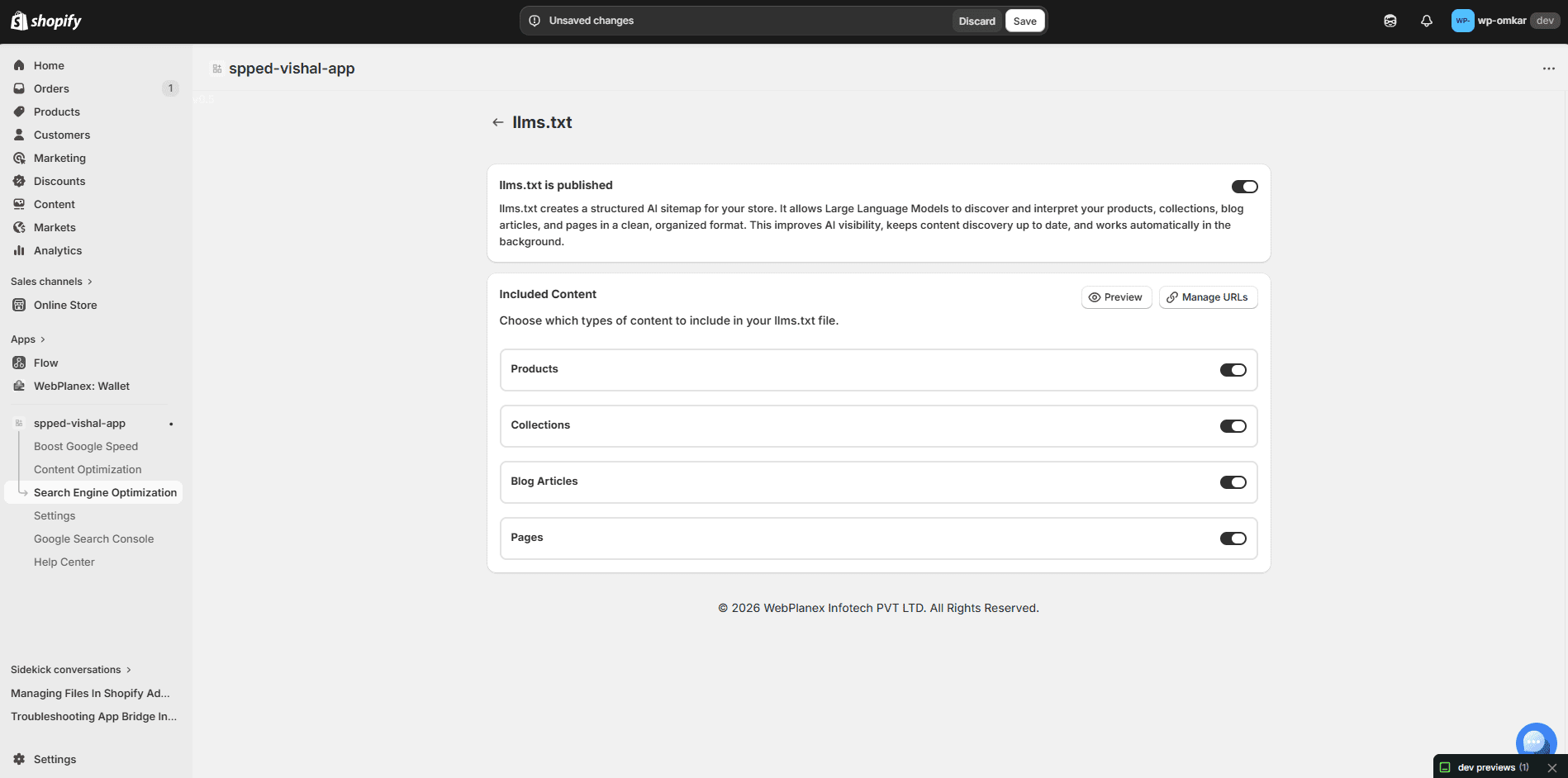
The generator doesn’t ask you to fill in a form or manually list your pages. It actually reads your store as it is, products, collections, blog posts, standalone pages, and builds the LLMs.txt file based on what’s really there. You don’t have to remember to include anything manually. That alone changes a lot.
Manually maintained files go stale fast. A Shopify store adds new products, creates seasonal collections, publishes blog content, and a static LLMs.txt file that was accurate in January is incomplete by March. SpeedBoostr’s version updates dynamically in the background as your store changes. The file that an AI system reads when it indexes your store is always current.
Merchant-Level Control Over What Gets Included
Not everything in your store is equally worth surfacing to AI systems. Draft products, internal pages, checkout flows, account management pages, you probably don’t want those mapped. The generator lets you decide, piece by piece, what gets included. Products, collections, blog posts, custom pages, you can pick and choose, no strings attached. Honestly, this matters more than you’d expect. An LLMs.txt file that maps irrelevant pages adds noise. AI systems are trying to understand what’s meaningful about your store, helping them focus on the right content is part of the optimization.
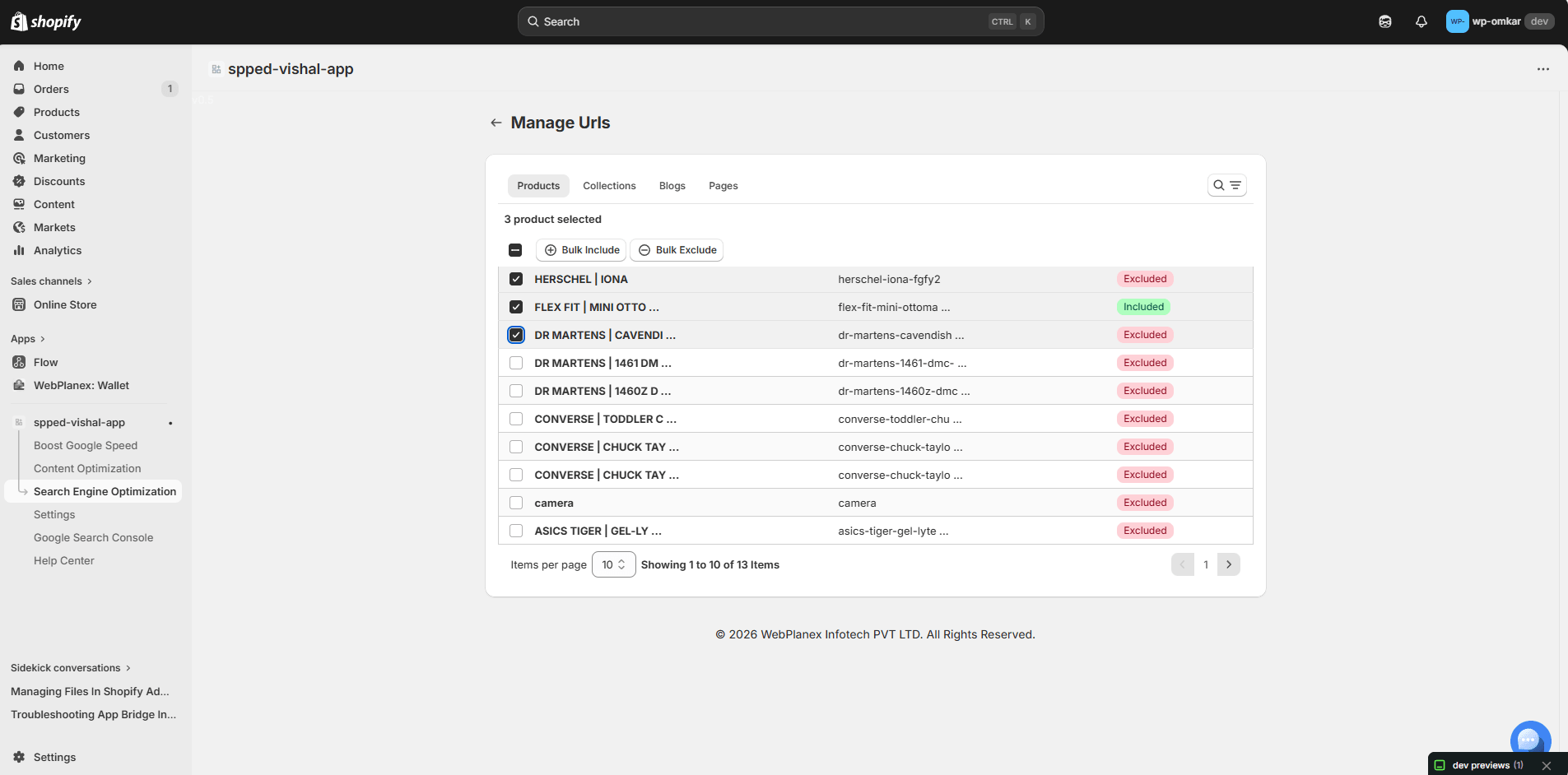
What the File Actually Contains
For each content type you include, the generated file structures the information in a way that gives AI systems real context: page titles, URLs, and descriptive metadata that explains what each page contains. For a product page, that means the product name, category, and enough descriptive context for an AI to accurately represent it. For a collection, it means the collection name and what type of products it contains. For a blog post, the title and topic.
The structure is readable by both machines and humans, which matters because it’s occasionally useful to check what your LLMs.txt actually says about your store, particularly after a major catalog change.
Quick check: After generating your LLMs.txt, visit yourstore.com/llms.txt in a browser. You should see a structured plain-text document mapping your store content. If you see a 404, the file hasn’t been activated properly — revisit the SpeedBoostr dashboard.
The Advanced Robots.txt Manager: The Underrated Half of This Update
The LLMs.txt feature gets most of the attention because it’s newer and more novel. But the Advanced Robots.txt File Manager that shipped alongside it is arguably more immediately impactful for a lot of stores, because robots.txt problems are already costing merchants traffic right now, not at some future point when AI search matures further.
Why Robots.txt Management Has Always Been Painful on Shopify
Shopify doesn’t exactly hand you the keys when it comes to robots.txt. The platform auto-generates that file, and changing it used to mean wrestling with Shopify’s liquid templates, which, let’s be honest, can drive even patient people mad, or risking custom code that breaks the next time your theme updates.
A poorly set up robots.txt can block search engines from crawling the important pages. Or, the file ends up letting bots into areas you’d rather keep private. Sometimes it’ll even clash with your SEO tools and mess with tracking. These aren’t rare problems, they happen all the time. And the worst part? You usually won’t know there’s an issue until your site’s search ranking tanks out of nowhere. They just quietly cost you traffic over time.
What the Manager Actually Gives You
SpeedBoostr’s Robots.txt Manager lets you build and edit crawl rules through a clean dashboard interface, no code required, no liquid templating. The rule structure is simple: you choose Allow or Disallow, specify the user agent (Googlebot, AdsBot, AhrefsBot, or any other crawler), and set the URL path the rule applies to.
User-agent specificity is the part that experienced SEO practitioners will appreciate most. Generic robots.txt files apply rules to all bots equally. But Googlebot, Google’s AdsBot (which affects your ad Quality Scores), and third-party crawlers like AhrefsBot have different purposes and different implications for your store. Being able to configure them independently, without writing the syntax by hand and hoping you got the formatting right, removes a real operational barrier.
The interface is also searchable, which sounds minor until you’re managing a ruleset with twenty or thirty entries and trying to find a specific path configuration quickly.
Why These Two Features Belong Together
It’s tempting to think of LLMs.txt and robots.txt management as solving separate problems, one for AI search, one for traditional search. That’s true as far as it goes. But there’s a more integrated way to think about it.
Your robots.txt controls what crawlers can access. Your LLMs.txt controls what AI systems understand about what they access. Both are about giving external systems, whether that’s Googlebot or a language model, the right information about your store in the right format. Neither one does much without the other being configured correctly.
A perfectly structured LLMs.txt file is less useful if your robots.txt is inadvertently blocking AI crawlers from the pages that matter most. A well-configured robots.txt loses some of its value if AI systems that do access your pages have no structured context to interpret them with. The two files work together, and having both manageable in the same tool, in the same dashboard where you’re already managing speed and SEO, removes the friction of treating them as separate problems requiring separate solutions.
Who Gets the Most From This
Practically speaking, the LLMs.txt Generator is valuable to almost any Shopify store that sells more than a handful of products. Stores with big, complicated catalogs get the most out of this. Think clothing shops with hundreds of SKUs, beauty brands mixing similar product lines, or specialty retailers with technical categories all over the place. The Robots.txt Manager shines when stores have grown the way most do, new apps, random extra pages, collections constantly shifting, and nobody’s actually going through and checking the crawl rules.
If your store has been running for two or more years without a deliberate robots.txt review, there’s a reasonable chance something in it isn’t configured the way you’d want it if you looked closely.
Both features are available on SpeedBoostr’s paid plans, starting at $9.99 per month. Given that those plans also include Google PageSpeed optimization, CSS and JS compression, image compression, automated scheduling, and Search Console integration, the per-feature cost is not a meaningful objection for most stores.
Free plan note: SpeedBoostr’s free plan covers core speed optimization for up to 50 pages per month. The LLMs.txt Generator and Robots.txt Manager require a paid plan. If you’re deciding whether to upgrade, these two features alone tend to justify the Startup tier ($9.99/month) for stores with active SEO goals.
SpeedBoostr is available on the Shopify App Store. Paid plans start at $9.99/month. LLMs.txt Generator and Robots.txt Manager included. Install at apps.shopify.com/speed-optimization-webplanex