



A customer sees a handbag on Instagram and saves a screenshot. Later, they visit your Shopify store to find something similar. They know the look they want, but they cannot describe its shape or style.
“Brown handbag” returns too many products. “Small shoulder bag” misses the design they had in mind. After several attempts, they leave.
Visual search for Shopify gives shoppers another way to find products. They upload a photo and receive similar items from your catalog. Alongside clear navigation and well-planned Shopify store development, it can help customers move from a reference image to a product they want to buy.
What Is Visual Search?
Visual search lets customers search for products using a photo instead of keywords. It compares visible details in an uploaded image with product images in a store’s catalog.
These details may include:
- Color
- Shape
- Pattern
- Texture
- Product design
For example, a customer could upload a picture of a round wooden coffee table. The search tool may return tables with a similar shape and finish, depending on what your store sells.
Results may include similar items rather than exact matches. Customers still need to check dimensions, materials, prices, and availability before buying.
Why Do Customers Struggle With Text Search?
Text search works well when customers know a product’s name, brand, or model number. It becomes harder when they only have a picture.
A shopper may search for a “flower dress,” while your listing describes it as a “botanical print dress.” Someone looking for a curved sofa may not know the design term used in your catalog.
Common problems include:
- Customers use different words for the same product.
- Broad searches return too many unrelated items.
- Shoppers do not know the correct product name.
- Search tools fail to recognize spelling mistakes or similar terms.
Visual search gives customers another starting point. They can use the image they already have instead of trying several descriptions.
How Does Visual Search Work on Shopify?
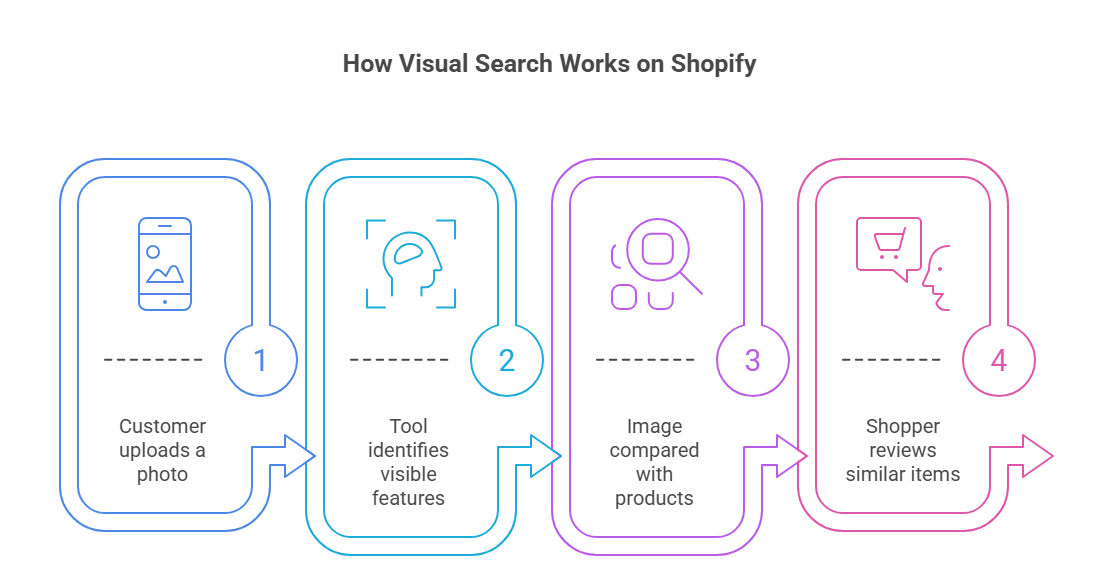
Merchants can add image-based product search through a compatible app or a custom integration. The process depends on the tool, but it usually follows four steps.
1. The Customer Uploads a Photo
The shopper selects a photo, screenshot, or saved image from their device. Some tools may also allow customers to take a picture.
The upload option should be easy to find near the store’s search bar, with clear instructions about supported files.
2. The Tool Identifies Visible Features
The system analyzes the image to identify the item and details such as shape, color, and pattern.
A clear photo showing one main product usually provides a better starting point than a crowded image containing several objects.
3. The Image Is Compared With Your Products
The tool compares the uploaded image with product images in your catalog.
Clear photography, accurate product categories, and current listings help support useful matches. A tool cannot return a suitable product if your catalog does not contain one.
4. The Shopper Reviews Similar Items
The customer receives a selection of matching or similar products. They can open each listing and compare the available options.
Filters help them narrow the results by:
- Price
- Size
- Color
- Availability
How Can Visual Search Help Increase Shopify Sales?
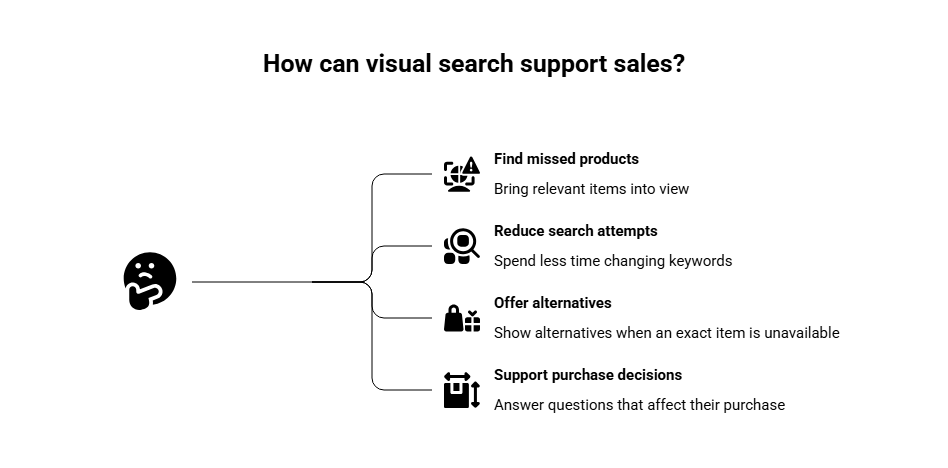
Visual search can support sales by helping customers find suitable products with less effort. Its value depends on the quality of the matches and what happens after a shopper opens a listing.
Help Customers Find Products They Might Miss
Shoppers do not always use the same words as your product listings. They may also leave before browsing every collection.
A photo search can bring relevant items into view without requiring the customer to know the correct terms. This can be useful in stores with many styles, patterns, or designs.
Reduce Repeated Search Attempts
Typing several versions of the same request takes time. Customers may stop searching when the results do not improve.
Visual search lets shoppers start with a reference image. When the results are useful, they can spend more time comparing products and less time changing keywords.
Offer Alternatives When an Exact Item Is Unavailable
Your store may not stock the product shown in a customer’s photo. A similar option could still meet their needs.
For example, someone searching for a particular handbag may consider another bag with a similar shape, color, and strap style.
Results should clearly show alternatives without suggesting that every detail matches the uploaded image.
Support Purchase Decisions
Finding a visually similar item brings the customer to a product page. That page needs to answer the questions that affect their purchase:
- Is the right size available?
- What is the product made from?
- How much does delivery cost?
- When will the order arrive?
- What is the return policy?
Thoughtful Shopify product page customization helps present these details clearly.
How Visual Search Connects Product Discovery With Sales
| Benefit | How it helps shoppers | How it can support sales |
| Easier product discovery | Finds similar items without guessing keywords | Brings overlooked products into view |
| Fewer search attempts | Reduces repeated typing and browsing | Gives customers fewer reasons to leave |
| Relevant alternatives | Shows similar options when an exact item is unavailable | Helps shoppers consider a substitute |
| Product comparisons | Presents similar styles at different prices | Helps customers choose an option that fits their needs |
These are possible benefits. Track actual customer actions and purchases to assess the impact on your store.
Which Shopify Stores Can Benefit From Visual Search?
Visual search is useful when appearance plays a large part in choosing a product.
Fashion and Accessories
Customers often save clothing inspiration from social media. Photo search can help them find similar:
- Dresses and tops
- Shoes
- Handbags
- Sunglasses and other accessories
They still need to check sizing, fabric, and fit on the product page.
Furniture and Home Decor
Shoppers may recognize the style they want without knowing its name.
A reference photo can help them search for similar chairs, tables, lamps, rugs, or decorative items. Dimensions and material details remain essential before purchase.
Jewelry
Customers may want a particular ring shape, necklace style, or earring design but lack the terms to describe it.
Visual search can help them compare appearances. Product descriptions must confirm details such as metal type, stone information, and measurements.
A small store selling products usually searched by model number may have less need for visual search. The feature should solve a customer problem.
What Should You Check Before Adding Visual Search?
Before selecting a tool, review how customers search and whether your catalog can return useful matches.
Ask:
- Do shoppers send reference photos to your support team?
- Do customers struggle to describe your products?
- Does your catalog contain enough similar options?
- Are product images clear and up to date?
- Can the tool report searches, clicks, and purchases?
Also check compatibility with your theme, catalog size, and mobile shopping experience.
A simple upload process, readable results, and clear filters support a better store user experience.
How Can You Improve Visual Search Results?
Good results start with a well-maintained catalog.
Use Clear Product Images
Show the product clearly and include useful angles. Avoid relying only on lifestyle photos where the item is small or partly hidden.
Keep Product Information Accurate
Maintain current titles, categories, sizes, materials, prices, and stock details. These help customers assess the matches and may support filtering, depending on the tool.
Test With Customer Photos
Use screenshots and everyday photos, not just your own catalog images.
Test images with:
- Different lighting
- Background objects
- More than one product
- Partly hidden items
Review where the tool struggles and whether customers receive a useful next step.
How Do You Measure Whether Visual Search Helps Sales?
Track the path from an image upload to a completed purchase.
Useful measures include:
- Usage: How many shoppers upload an image?
- Result clicks: Do they open the suggested products?
- Add-to-cart actions: Do the matches lead to buying interest?
- Completed purchases: Do customers place orders?
- Unsuccessful searches: Which images return poor or empty results?
Compare performance over time. Customers using visual search may already have stronger buying intent, so a higher conversion rate alone does not prove the feature caused the increase.
Frequently Asked Questions
Does Shopify Visual Search Replace Text Search?
No. Text search works well when customers know a product’s name or model number. Visual search provides another option when they have a photo but cannot describe the item.
Can Customers Find an Exact Product Using a Photo?
They may find an exact match if your store stocks the item and the tool recognizes it. Otherwise, the results may show visually similar products.
Can Visual Search Increase Shopify Sales?
It can support sales by reducing search effort and helping customers reach suitable products. Results also depend on pricing, availability, product details, delivery, and checkout.
How Do I Add Visual Search to My Shopify Store?
Use a compatible visual search app or a custom integration. Check theme compatibility, catalog support, mobile usability, pricing, and reporting before choosing a tool.
Does Visual Search Work With Screenshots?
Many tools accept screenshots, but supported formats and matching quality vary. Check the tool’s requirements and test screenshots similar to those your customers would upload.
Conclusion
Visual search for Shopify helps customers find products they recognize but cannot easily describe.
For stores with suitable catalogs, it can reduce unsuccessful searches and bring relevant items into view. Clear matches, useful product information, and an easy checkout give those searches a better chance of becoming sales.